

Affiliate links on Android Authority may earn us a commission. Learn more
General technology
It’s not just you: This fundamental Google Search feature is broken worldwide
Time filters are no longer doing their job in Google Search.
By
•
Aug 1, 2026 — 10:06 PM ET
•
•
Edgar Cervantes / Android Authority
TL;DR
- Google Search’s time filters appear to be broken, showing results from random dates instead of the selected timeframe.
- The issue seems to affect multiple accounts, devices, and searches worldwide, suggesting it may be a bug.
- Until Google fixes it, using the after/before:YYYY-MM-DD search operator remains the only workaround.
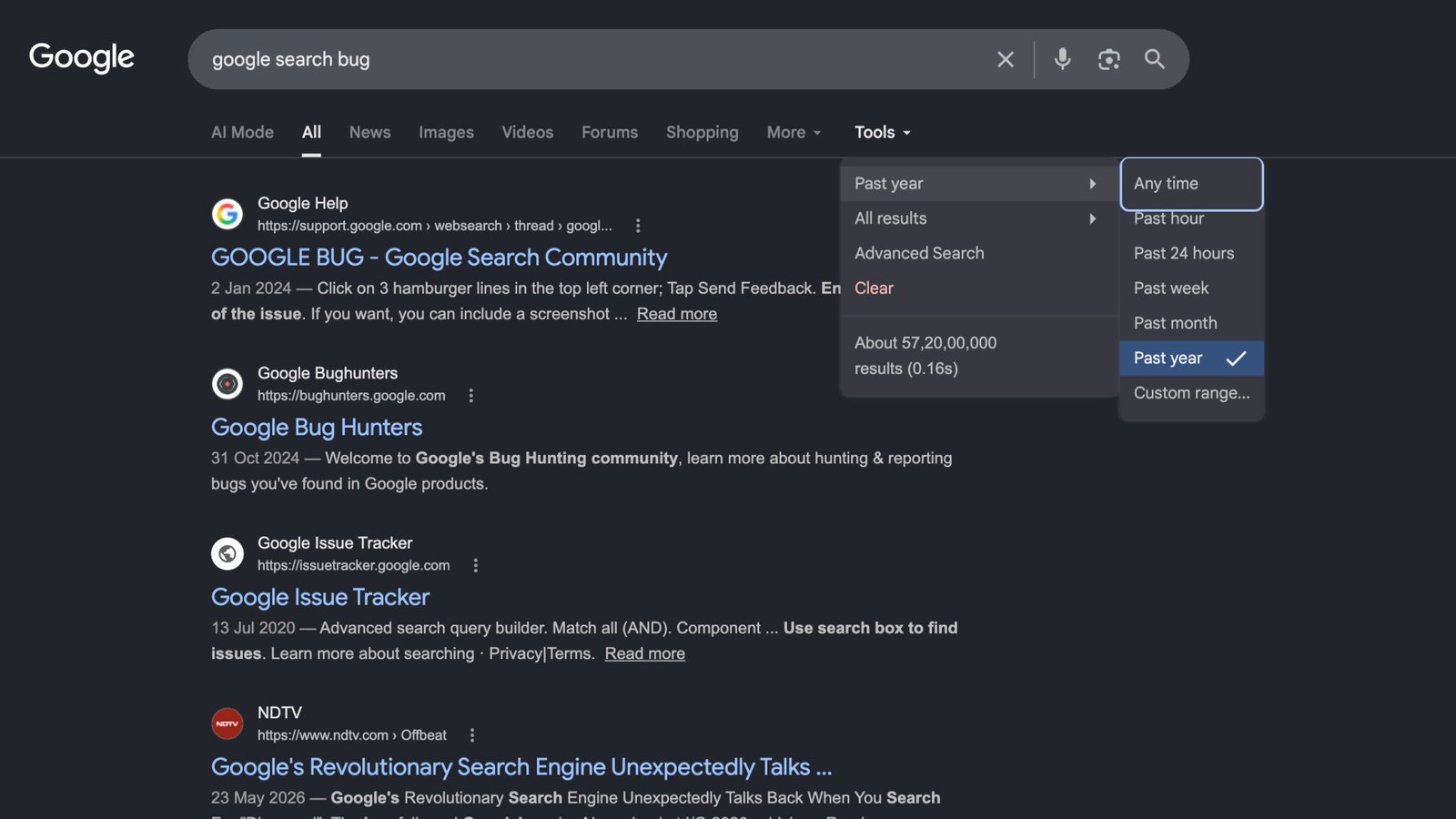
Google Search’s time filters have been one of the easiest ways to find the latest information on any topic. They’re very helpful when you’re looking for search results within a specific time period, whether it be breaking news, software updates, or recent discussions. Google has provided options such as Past hour, Past 24 hours, Past week, Past month, Past year, and custom range as essential parts of Search for as long as memory serves, but it looks like these tools are now completely broken.
A reader tipped us off to the development after noticing that Google Search’s time filters, which were working correctly just a couple of days ago, are no longer returning results from the selected time period. We were able to reproduce the issue across multiple Google accounts, devices, and search queries
Adamya Sharma / Android Authority
Instead of limiting results to the selected time period, Google Search returns a mix of pages from random dates, including both older and newer content that doesn’t match the chosen filter. The issue is also not limited to a specific browser, account, or search term
Reports on Reddit suggest the issue has persisted for at least a few days. While Google hasn’t acknowledged the problem, it appears to be affecting searches globally, suggesting a potential bug on Google’s side
Thankfully, there is a workaround you can still use to get the timed search results you want. Instead of using the time filter dropdown, you can add a date operator directly to your search. For example, searching for “after:2026-07-01” will limit results to pages published after July 2026
According to one Reddit user, the issue may lie with the JavaScript powering Google’s time filter dropdown, while the underlying search operator continues to function correctly
For now, if Google’s built-in time filters aren’t giving you recent results, the manual search operator is your best bet until Google fixes what appears to be a widespread Search bug
News
GoogleGoogle Search
Follow
Thank you for being part of our community. Read our Comment Policy before posting
Related:
<a href="https://yoursite.com/automation-training-benin/” title=”Digital Automation Training Benin: 5 Winning Skills Employers Demand in 2026″>
Digital Automation Training Benin: 5 Winning Skills Employers Demand in 2026
<a href="https://yoursite.com/automation-africa/" title="WhatsApp Marketing Automation Africa: 6 Dangerous Mistakes Brands Make in Nigeria”>
WhatsApp Marketing Automation Africa: 6 Dangerous Mistakes Brands Make in Nigeria
Want to learn this practically?
Join Justfine Infotech and build real digital skills in AI, automation, web development, digital marketing, office productivity, e-commerce, freelancing and cybersecurity.
Available Programmes:
6 Weeks Certificate • 3 Months Professional Certificate • 6 Months Diploma • Full Professional Diploma
WhatsApp:
+229 01 57 57 99 15
+229 01 66 68 11 60
Source: www.androidauthority.com


 English (UK)
  Français