

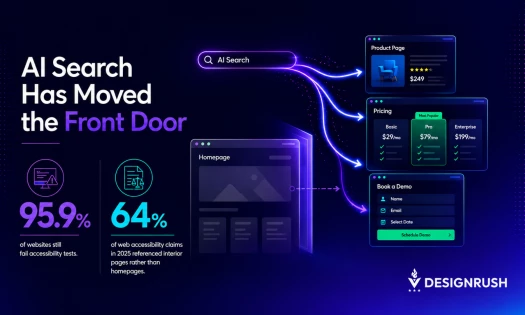
As many as 95.9% of the world’s top homepages contain detectable accessibility issues, up from 94.8% in 2025, per WebAIM’s 2026 Million Report
Moreover, those failures are not always related to only the homepage, as confirmed through AudioEye’s 2026 Digital Accessibility Index
The study revealed that as AI-powered search sends two-thirds of users directly to pricing pages, product pages, booking forms and other internal pages instead of homepages, accessibility barriers are surfacing where businesses win or lose customers
As such, it’s safe to say that the homepage is no longer the front door to most websites
This is especially true as people generally steer to pages that answer their question, compare a service or require them to take the next step
WordPress development agency, IT Monks, believes that this requires a different way of thinking about website accessibility
The agency’s CEO, Alex Osmichenko, explains that website accessibility shouldn’t be treated as a final compliance check
Instead, it should be built into every reusable component and customer interaction from the start
“Businesses have spent years polishing their homepage because that’s where they expected people to arrive, but AI search has changed that journey,” Alex Osmichenko says
“Someone can land on a pricing page, make a decision in under a minute and leave without ever seeing the rest of the website. That’s why accessibility has to exist everywhere, not just on the homepage.”
AI Search Is Exposing Website Accessibility Gaps
Most accessibility audits still begin with the homepage. But that’s becoming a blind spot
AudioEye found that AI search is directing users to internal pages, which contain 10% more accessibility issues than homepages
That’s because they’re built around forms, account access, dynamic content and other interactive elements
WebAIM’s study showed a similarly sobering conclusion, where researchers identified more than 56 million accessibility errors across one million homepages
Alarmingly, many homepages still have issues
More than 83.9% contain low-contrast text, 53.1% have missing alternative text, and 51% feature missing form labels
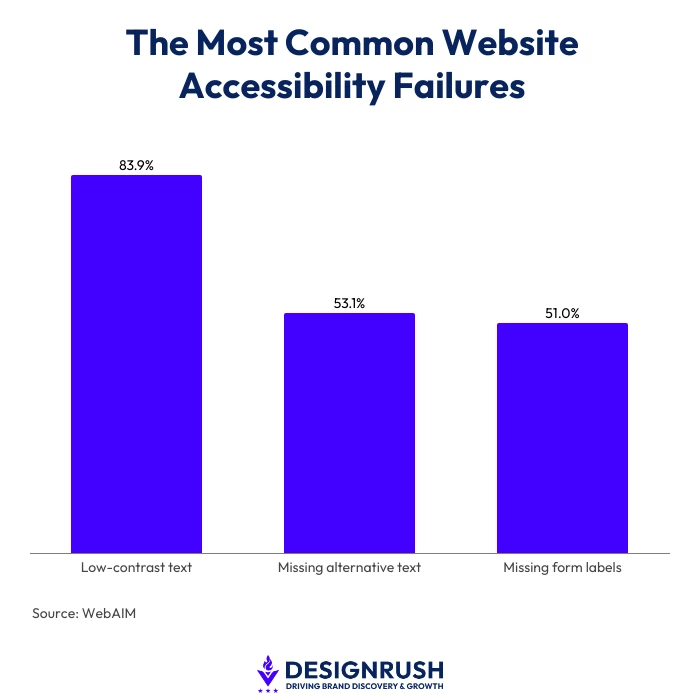
Not addressing these can become far more costly when they appear on pages where customers compare services, request quotes or complete purchases
So much so that AudioEye’s research found that 64% of web accessibility claims filed in 2025 referenced interior pages rather than homepages
This means that if a visitor can’t submit a form or navigate a checkout, they don’t look for another path, they don’t try to find another way
They just leave
“We still see companies measuring accessibility where traffic used to enter the website instead of where customers actually make decisions. That’s the gap AI search has exposed,” Alex Osmichenko adds
Why Website Accessibility Now Affects Conversions
The pages that attract visitors through AI-powered search are often the same pages where businesses generate enquiries and sales
AudioEye found that 21% of accessibility issues are classified as high risk, which affect critical interactions such as purchases, account access and form submissions
That matters even more because AI-referred visitors convert at 4.4 times the rate of traditional organic traffic, per AudioEye
And as more decision-ready visitors arrive on product pages, pricing pages and enquiry forms, accessibility failures become harder to ignore
“Teams often focus on getting more visitors, but visitors don’t become customers unless they can complete the journey,” Alex Osmichenko says
“Accessibility influences that journey far more than many organizations realize because it’s built into every click, every form and every decision a user makes.”
Three Accessibility Fixes That Improve Conversions
Most accessibility barriers don’t require a complete website redesign
Alex Osmichenko recommends treating accessibility as an ongoing development process rather than a final compliance check
This includes focusing on the systems and interactions that shape every customer journey
1. Build Accessibility Into Components, Not Pages
Rather than fixing individual pages after launch, businesses should focus on the reusable components that appear across their websites
That starts with building accessible components from the outset rather than correcting accessibility issues page by page after launch
Buttons, forms, navigation menus and content blocks built with accessibility in mind create a more consistent experience while reducing repeated development work
2. Design Forms and CTAs as User Interactions
Forms and calls to action are often where customers decide whether to continue or leave
Alex Osmichenko also recommends reviewing every customer interaction with accessibility in mind, from keyboard navigation and focus states to clear labels, error messages and color contrast
3. Combine Automated Testing With Human Reviews
While automated tools are an important part of accessibility testing, they are only part of the picture
Regular manual testing helps uncover issues related to navigation, usability and real-world interactions that automated scans often miss
Here, Alex Osmichenko recommends testing websites with screen readers, keyboard-only navigation and real users rather than relying solely on automated tools, which cannot identify every accessibility issue
That includes testing how real users complete common tasks rather than simply checking whether individual pages meet technical requirements
“Accessibility becomes much easier to manage when it’s built into the way websites are developed instead of being treated as something to fix afterwards,” Alex Osmichenko adds
“The goal isn’t simply to pass an audit. It’s to create an experience people can actually use.”
Website Accessibility Is Becoming a Competitive Advantage
For years, businesses focused on making the homepage accessible because that’s where most customer journeys began. AI-powered search has changed that
Visitors now arrive wherever the answer lives, whether that’s a product page, booking form, pricing page or support article
That puts greater pressure on the pages built to generate enquiries and sales
“Accessibility can no longer sit at the end of a website project or exist only to satisfy compliance requirements. It’s become a part of how businesses earn trust, remove friction and support decisions from the first click,” Alex Osmichenko says
With the majority of businesses still treating the homepage as the most important page on their website, it’s important to ask
If AI search has already moved the front door, is your business still optimizing for the wrong entrance?
Related:
Digital Automation Training Benin: 5 Winning Skills Employers Demand in 2026
WhatsApp Marketing Automation Africa: 6 Dangerous Mistakes Brands Make in Nigeria
Want to learn this practically?
Join Justfine Infotech and build real digital skills in AI, automation, web development, digital marketing, office productivity, e-commerce, freelancing and cybersecurity.
Available Programmes:
6 Weeks Certificate • 3 Months Professional Certificate • 6 Months Diploma • Full Professional Diploma
WhatsApp:
+229 01 57 57 99 15
+229 01 66 68 11 60
Source: news.designrush.com

 English (UK)
  Français