

Configuring Cloudflare WAF correctly represents the primary defensive boundary between your production infrastructure and aggressive web application exploits in 2026. While basic Content Delivery Networks (CDNs) cache assets to improve page latency, leaving your origin web server unprotected against automated exploitation scripts invites disaster. Unprotected web applications face relentless brute-force sweeps, unauthorized database enumeration, and layer-7 denial-of-service barrages every minute of the day.

Across the expanding digital ecosystems of West Africa, commercial web applications, regional fintech endpoints, and enterprise portals are subjected to constant automated scanning. Hoping that default hosting firewalls will block website attacks is an operational failure. True network defense requires establishing deterministic perimeter controls that evaluate incoming HTTP packets at the edge. By mastering the five rules outlined in this guide, you will lock down critical administrative paths, challenge hostile botnets, and establish verifiable origin security.
Table of Contents
The Perimeter Imperative: Why Origin Servers Fall Without Edge WAF
Traditional web hosting configurations rely entirely on local server defenses such as standard .htaccess directives, basic PHP security modules, or local iptables rules. When an attacker unleashes a volumetric Layer 7 flood or automated vulnerability scan against these endpoints, the origin web server must process every single incoming TCP connection and HTTP header before taking defensive action.
This local processing architecture consumes vital server RAM and CPU threads. Under sustained loads, Apache or NGINX web servers exhaust worker processes, resulting in 502 Bad Gateway errors for legitimate clients:
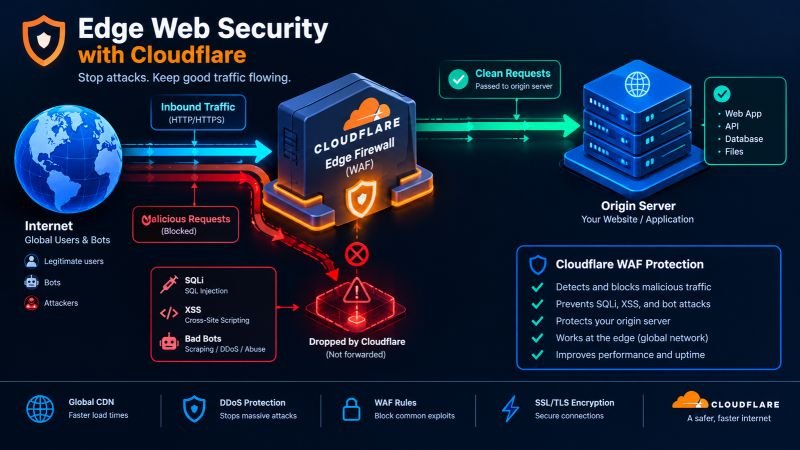
[Attacker Network / Botnet] ────────┐
├──► [Target DNS] ──► [Exposed Origin Server]
[Automated Vulnerability Scanners] ──┘ │
(CPU & RAM Exhaustion: System Collapse)
────────────────────────────────────────────────────────────────────────────────────────
[Attacker Network / Botnet] ────────┐
├──► [Cloudflare Edge WAF] ──► (HTTP 403: Blocked)
[Automated Vulnerability Scanners] ──┘ │
└──► [Isolated Origin Server]
(Only Clean Payloads Reach Disk)
By configuring Cloudflare WAF at the authoritative DNS edge, malicious traffic never reaches your physical or virtual hosting hardware. Malicious packets are inspected, challenged, or dropped directly at regional Cloudflare data centers before touching your database.
To review how defensive perimeter systems integrate with broader technology curriculums, examine our comprehensive guide on [Internal Link: Academy Course Catalog / All Academic Programs].
Rule 1: Lock Down Administrative Portals via Strict Geographic and ASN Filters
Public exposure of your core backend endpoints (such as /wp-admin/, /administrator/, or custom /api/internal/ dashboards) invites automated dictionary attacks and zero-day authentication bypass attempts. Administrative surfaces must never be accessible globally.
Execute this rule inside your Cloudflare Dashboard under Security > WAF > Custom Rules:
(http.request.uri.path contains “/wp-admin” or http.request.uri.path contains “/wp-login.php”)
and not ip.geoip.country in {“BJ” “TG” “NG”}
- Action: Block (or Managed Challenge).
- Defensive Objective: If your administrative personnel operate within Benin, Togo, or Nigeria, incoming requests targeting administrative portals originating from untrusted regions are dropped immediately.
- Secondary Layer: For maximum perimeter enforcement, bind administrative login paths to specific Autonomous System Numbers (ASNs) associated with verified regional Internet Service Providers.
Rule 2: Terminate SQL Injection and Cross-Site Scripting via URI Pattern Rules
Automated exploitation kits continuously probe web search parameters, contact forms, and URL query strings with malicious SQL payloads and cross-site scripting (XSS) markers.
Create a dedicated custom rule targeting common injection payloads across all inbound query strings:
(http.request.uri.query contains “union+select” or
http.request.uri.query contains “concat(” or
http.request.uri.query contains “<script>” or
http.request.uri.query contains “base64_decode(“)
- Action: Block.
- Defensive Objective: Drops requests containing known SQL manipulation functions or unencoded client-side scripting tags before they reach backend application parsers.
For authoritative guidelines on modern application vulnerability categories and injection taxonomy, consult the [External Link: OWASP Top 10 / Web Application Security Risks Documentation].
Rule 3: Mitigate Bot Floods and Scrapers via Automated Threat Scoring
Malicious web crawlers and content scrapers degrade web server performance and extract commercial pricing data without authorization. Cloudflare evaluates client traffic using dynamic threat intelligence scores rated from 0 (clean) to 100 (confirmed hostile).
Build a dynamic challenge rule leveraging Cloudflare’s behavioral intelligence:
(cf.threat_score gt 15 and not cf.client.bot)
or (cf.client.bot and not cf.bot_management.verified_bot)
- Action: Managed Challenge (Interactive Turnstile or CAPTCHA).
- Defensive Objective: Legitimate search engines like Googlebot and Bingbot (which match cf.bot_management.verified_bot) pass unimpeded. Unverified headless crawlers and suspicious browser fingerprints must prove their legitimacy via an edge challenge before accessing server content.
Rule 4: Neutralize Malicious User-Agent Headers and Headless Automated Scanners
Adversaries routinely execute automated reconnaissance against enterprise platforms using automated vulnerability scanning tools such as SQLmap, Nikto, Acunetix, or Python’s default requests library.
Construct an explicit User-Agent drop rule to deflect automated probing:
(http.user_agent contains “sqlmap” or
http.user_agent contains “nikto” or
http.user_agent contains “python-requests” or
http.user_agent contains “curl” or
http.user_agent eq “”)
- Action: Block.
- Defensive Objective: Legitimate commercial users interact with web platforms via standard modern mobile and desktop web browsers. Dropping automated scanning strings and blank User-Agent headers eliminates noise from server access logs.
Rule 5: Enforce Zero Trust Tunneling to Prevent Direct Origin IP Discovery
The most common architectural mistake administrators make is configuring WAF rules while leaving the origin server’s direct IP address discoverable. If an adversary discovers your hosting server’s public IPv4 address, they can send malicious HTTP packets directly to the server, bypassing edge WAF proxies entirely.
- Deploy Cloudflare Tunnels (cloudflared): Install the lightweight Cloudflare Tunnel daemon on your origin server.
- Close Inbound Edge Ports: Close public inbound ports 80 and 443 entirely on your server’s physical firewall.
- Establish Encrypted Outbound Tunneling: Allow communication only via encrypted outbound connections routed directly through Cloudflare’s edge infrastructure.
By eliminating direct inbound IP access, attackers cannot circumvent your firewall parameters, guaranteeing complete perimeter enforcement. For technical instructions on configuring edge proxy daemons, review the Official Cloudflare Documentation / Cloudflare Tunnel Configuration Architecture.
To evaluate your operational readiness across broader defensive system architectures, run our free diagnostic on AI Readiness Assessment / Technical Systems Diagnostic.
Default Web Hosting Security vs. Hardened Edge WAF Protection
Comparing basic default hosting protections against an edge-configured Cloudflare WAF demonstrates why professional system administrators separate network traffic at the edge:
| Security Vector | Default Hosting Protection | Edge-Hardened Cloudflare WAF |
| Inspection Location | Physical hosting server CPU/RAM | Distributed edge servers (Anycast Network) |
| Volumetric Layer 7 Floods | Origin crashes due to connection limits | Absorbed and mitigated across edge data centers |
| Zero-Day Attack Response | Slow manual patch updates on origin | Edge virtual patching deployed within minutes |
| Bot Traffic Handling | Full resource overhead consumed | Unverified crawlers challenged at the edge |
| Origin IP Masking | Public IP vulnerable to direct port scans | Server IP completely shielded via Zero Trust Tunnel |
| Operational Impact | Frequent 502/504 server timeouts | Steady page speeds and maximum service uptime |

Master Practical Edge Defense at the JCS-701 Cybersecurity Lab
Reviewing firewall rules in an online guide provides a clear conceptual starting point, but production-grade digital defense requires practical laboratory execution. Configuring reverse proxies, analyzing live attack vectors, configuring SIEM alerts, and mitigating distributed attacks requires supervised technical training on enterprise hardware.
You can build, test, and validate these exact defensive configurations live inside the cybersecurity lab Benin facility at Justfine Digital & AI Skills Academy.
In our flagship practical course, JCS-701: Cybersecurity & Digital Defense, students master modern blue-team defense through direct, hands-on lab exercises under the guidance of experienced cybersecurity practitioners:
- Physical Campus Facility: Rue 1604 (near Boulangerie Kpankpan), Akpakpa, Cotonou, Littoral, Benin Republic.
- Core Blue-Team Stack: Cloudflare WAF, Kali Linux, Wireshark, Nmap, and SIEM event dashboards.
- Instructional Framework: Learn → Build → Deploy → Earn → Grow.
- Dedicated Hardware Standard: Every enrolled student is assigned an individual high-speed desktop terminal, uninterrupted fiber internet, and continuous auxiliary power backup.
- Flexible Cohort Schedules: Choose between the Daytime Cohort (12:00 PM – 3:00 PM) or the Evening Professional Cohort (6:00 PM – 9:00 PM) on Mondays, Wednesdays, and Fridays.
- International Exam Alignment: Coursework maps directly to the globally recognized Google Cybersecurity Professional Certificate.
Stop leaving your web assets exposed to automated exploits. Reserve your dedicated computer terminal, master applied JCS-701 web defense principles, and build verifiable skills that enterprise security operations centers demand.
[Click Here to Message Technical Admissions on WhatsApp (+229 01 57 57 99 15) to Apply for JCS-701]
You can also submit your registration application directly through our [Internal Link: Academy Admissions Portal / Secure Your Cohort Workstation].
Frequently Asked Questions (FAQ)
Can configuring Cloudflare WAF accidentally block legitimate website visitors?
Yes, if rules are configured without proper testing. Applying overly broad URI keyword matches or blocking broad geographic zones can challenge legitimate buyers or remote team members. When deploying new WAF rules, always set the action to Log or Managed Challenge for the first 48 hours to inspect false positives in the Security Events log before switching the rule to Block.
What is the primary difference between Cloudflare’s free firewall and enterprise WAF rules?
The free tier of Cloudflare provides essential DDoS mitigation, basic unmanaged threat scoring, and up to 5 custom WAF rules. Advanced paid and enterprise plans introduce managed OWASP core rulesets, deep machine-learning bot intelligence, automated credential-leak detection, and detailed payload analytics designed for high-traffic enterprise architectures.
Does setting up Cloudflare WAF protect my database from internal network threats?
No. Cloudflare WAF operates strictly as an external perimeter proxy protecting public HTTP/HTTPS traffic. It does not secure internal local networks, direct SSH terminal access, or internal database queries behind the perimeter. Comprehensive defense requires pairing edge WAF filters with internal network hardening, least-privilege database roles, and secure terminal practices.
What practical skills do students build in the JCS-701 web defense lab in Cotonou?
Inside the JCS-701 web defense laboratory at Justfine Digital & AI Skills Academy in Akpakpa, students learn to inspect network packets with Wireshark, conduct defensive vulnerability audits using Kali Linux utilities, build resilient Cloudflare edge rules, and harden web application servers against automated attacks. Students graduate with verifiable competencies ready for SOC analyst and system administration roles.


 English (UK)
 Français